Get Started
Get Started


If your episodes sit in an ordinary YouTube playlist, your show may be missing out on YouTube Music and the podcast spotlight. Here is what the podcast setting does and how to switch it on in YouTube Studio.
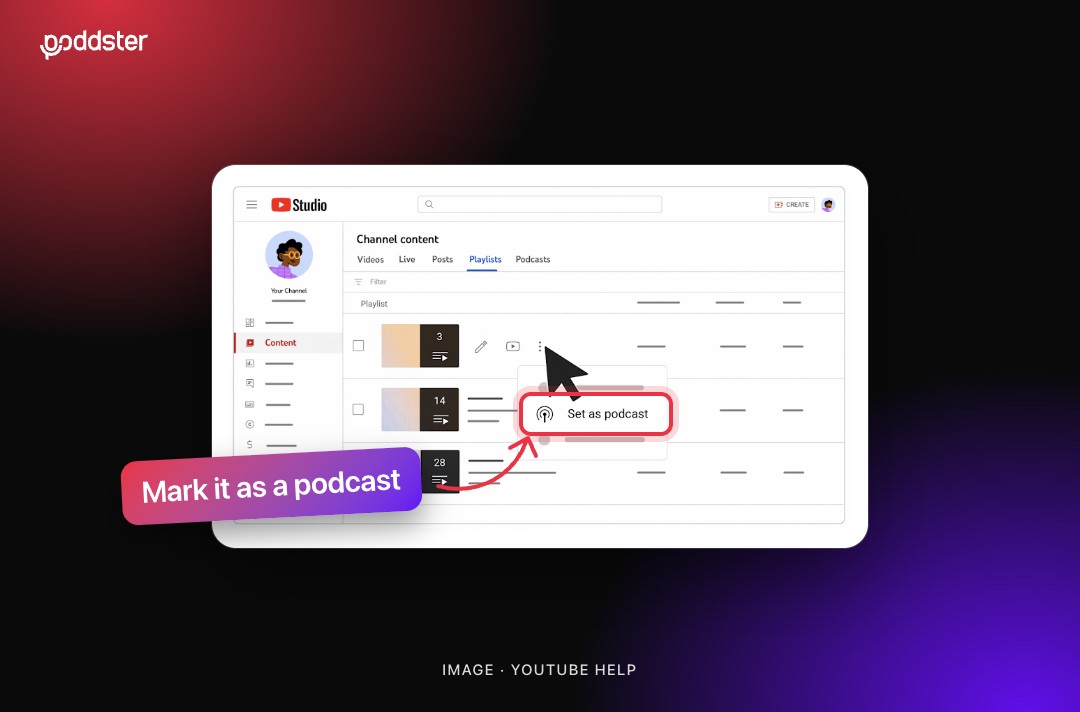
You can do everything right on YouTube, from a good thumbnail to a sharp title to a well-shot episode, and still miss one setting that decides whether YouTube treats your show as a podcast at all.
Podnews put it bluntly in October 2026: "if you don't mark it as a podcast, you don't get into YouTube Music, or the main Podcast homepage on YouTube." The fix takes a few minutes in YouTube Studio. Here is what it does and how to do it.
YouTube does not have a separate podcast upload. In its own words, "a podcast show is a playlist, and each podcast episode is a video in that playlist." What turns an ordinary playlist into a podcast is a setting called podcast features.
YouTube sometimes switches this on automatically when it classifies a playlist as a podcast. Do not assume it has. Check your channel, because if your episodes sit in a plain playlist, YouTube may not be treating your show as a podcast.
According to YouTube Help, podcast content may be eligible for:
Note the word eligible. Marking your playlist does not guarantee placement, and YouTube says some playlists are not eligible even when they are marked, including content the creator does not own. But without the setting, your show is not in the running at all, and that matters on a platform where YouTube reported more than 1 billion monthly podcast viewers in 2025.
Read more: Is your podcast missing from directories you don't even know exist?
Do this in YouTube Studio on a computer. YouTube's help instructions describe the desktop version.
If you already have a playlist of episodes
If you are starting from scratch
Switching the setting on is the easy part. A few choices decide whether it works in your favor:
1. Use a proper square thumbnail
YouTube recommends 1280 x 1280 pixels for the podcast thumbnail, and you need one to edit your podcast details. Use your show artwork, not a frame from an episode.
2. Full episodes only, in the right order
YouTube says your podcast should only contain full-length episodes, organized in the order they should be watched. Choose newest first for an episodic show, or oldest first for a series that should be followed from the start.
3. Keep clips and Shorts separate
Do not add podcast features to playlists of clips or seasons. YouTube also says Shorts made to support your podcast will not appear in YouTube Music, so treat them as promotion, not as episodes.
4. One podcast per show, with a real name
YouTube advises against generic titles such as "Full Episodes" or "Podcast," so use your show's actual name. It is one more reason why naming your show well matters, and a small, free part of good podcast SEO.
One last thing to know: podcast videos are available for audio-only playback, so make sure each episode still makes sense without the picture.
Want your show set up properly across YouTube and every other platform? Talk to Poddster about podcast distribution and launch support.








Join 5.1K podcasters, creators, and brands already producing, editing and growing their video content with the world's #1 podcast studio brand.