Get Started
Get Started


YouTube has simplified its top bar and put custom feeds, saved searches you describe in your own words, front and center. Here is what to do about it as a podcaster.

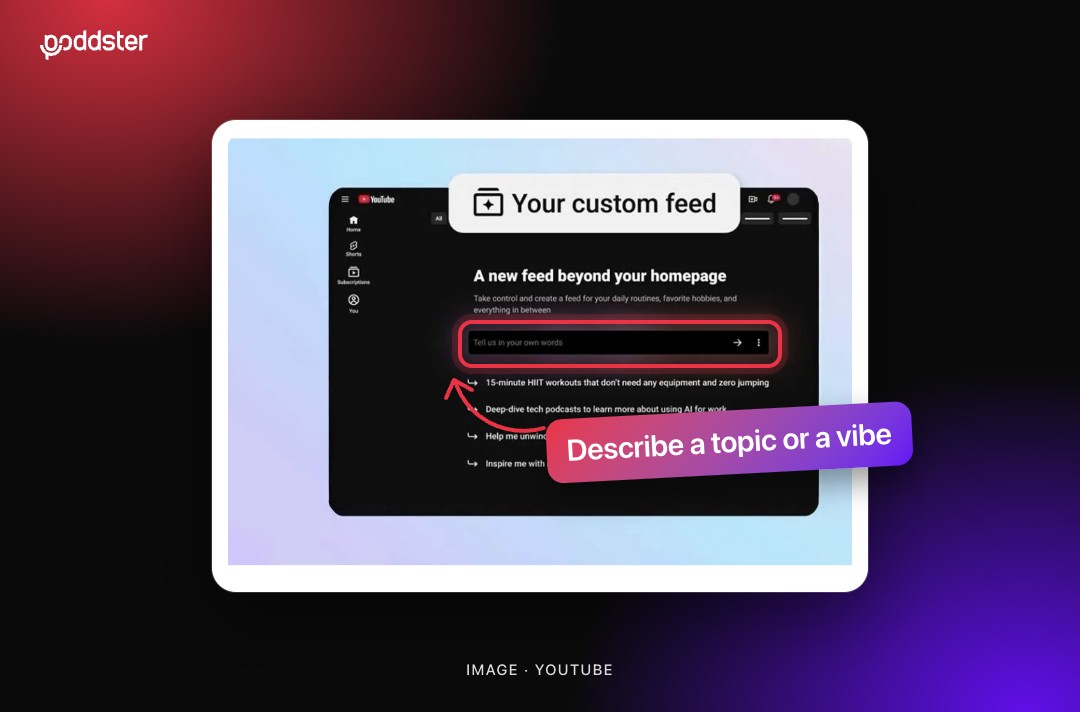
YouTube has refreshed its app and web experience, and the change that matters most for podcasters is a feature called custom feeds. It changes how viewers can ask YouTube for what they want, and that changes how a show can be found.
In its latest creator newsletter, YouTube said the app and web experience has been refreshed with a simplified top bar. It gives quick access to your subscriptions alongside Movies & TV, Live, Music and your custom feeds.
Custom feeds are personalized saved searches that go beyond keywords. A viewer can describe a type of content, a topic or even just a vibe, and then browse recommendations that are continuously updated when new content becomes available. Viewers can add, edit or remove their custom feeds in the top bar at any time.
The newsletter does not say where or when the refresh reaches everyone. When 9to5Google reported on custom feeds in May, it described them as rolling out in the United States, on mobile and desktop, to signed-in users with watch history turned on. Availability may be wider now, so check your own account before you make plans around it.
Custom feeds let viewers describe a topic or a vibe, and get recommendations that update as new content appears.
YouTube has not published how custom feeds choose or rank videos, and we are not going to guess. Anything that claims to know the secret of getting picked is speculation. What can be said is that a description-based search rewards content that is easy to describe.
Read more: how YouTube will recommend your podcast, based on what Made on YouTube announced.
These are our recommendations, based on how the feature is described. They are good practice whatever the algorithm does.
1. Say what each episode is about in plain words.
If a viewer typed a description of your episode, would your title and description match it? Write for a person describing what they want, not just for a keyword.
2. Name your series clearly.
Series and playlists with clear names help both viewers and YouTube understand what a group of episodes is. A viewer building a feed around a topic can then find a run of related videos.
3. Describe the mood as well as the subject.
Because viewers can ask for a vibe, tone matters. If your show is funny, calm or no-nonsense, say so in your channel description and in how you present episodes.
4. Publish consistently.
Custom feeds update as new content arrives. A channel that posts regularly has more chances to appear than one that goes quiet.
5. Keep audience trust in mind.
People are increasingly asking questions in their own words, whether to YouTube or to AI assistants. We explored the same idea in why your buyers are asking AI assistants questions your podcast should answer.
Discovery is moving away from a single search box and toward systems that understand descriptions. We have been following that shift in why YouTube is quietly becoming your podcast's front door. A show that is clear about what it is, who it is for and how it sounds is the best prepared for it.
If you want your channel set up to be found, talk to the Poddster team.







Join 5.1K podcasters, creators, and brands already producing, editing and growing their video content with the world's #1 podcast studio brand.