

Get Started
Get Started


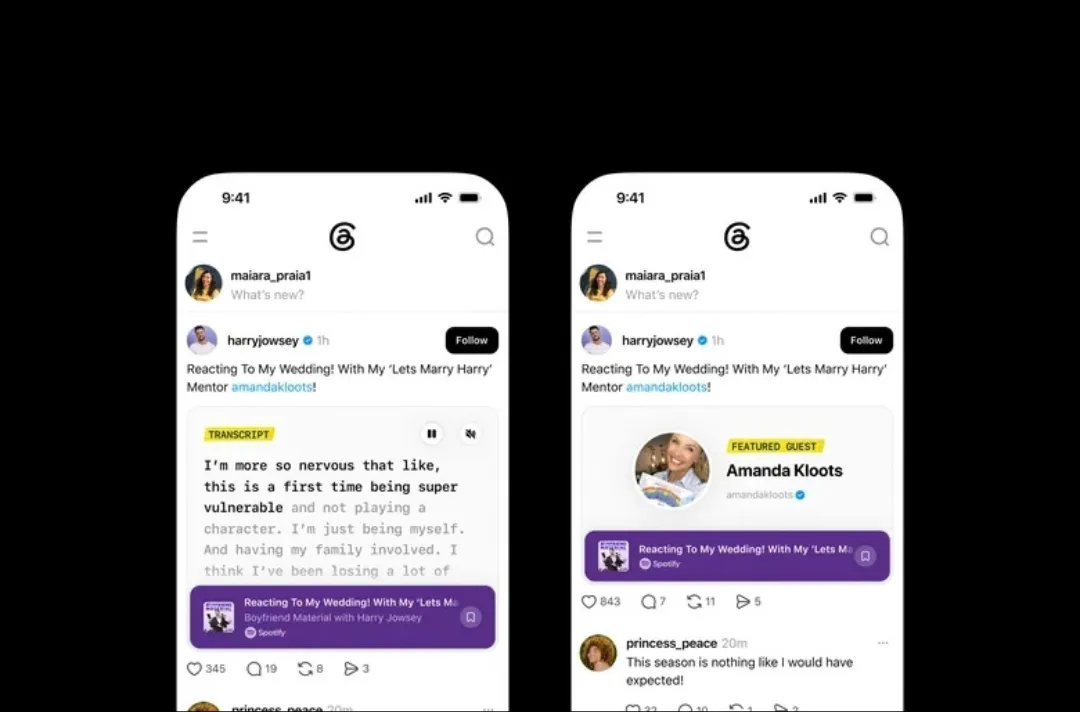
Meta has spent the past year testing podcast-adjacent features on Threads in bits and pieces. This week's rollout is the first time those pieces have looked like an actual toolkit: transcripts, save-for-later, guest tagging, and a real analytics panel, all built specifically around promoting a podcast episode.
A Threads post sharing an episode link can now display a video clip if the show has one, show a written excerpt of the transcript, or highlight a tagged guest. Creators get nudges to share an episode after it goes live, and a new insights panel tracks total views, the split between followers and non-followers seeing a post, taps on the episode preview, transcript reads, and saves. That's a genuinely useful set of numbers for judging whether a specific post is doing real distribution work, not just collecting likes.
Back in August, Threads was testing auto-captioned podcast clips, a much narrower feature aimed at making short clips watchable without sound. This rollout is a different order of investment: full transcripts, save behavior, and a dedicated analytics view are the building blocks of a platform trying to own part of a podcast's discovery and measurement funnel, not just make individual clips slightly more accessible.
The honest answer is: too early to say definitively, but the direction is worth taking seriously. YouTube's dominance in podcast discovery didn't come from a single feature, it came from years of building search, recommendations, and analytics specifically around long-form and podcast content. Threads is a long way from that scale. But the fact that it's now shipping transcript-driven discovery and creator-facing analytics, the exact kind of tools that made search-driven discovery work so well on YouTube, suggests Meta sees the same opportunity and is trying to build toward it deliberately rather than bolting on one-off features.
1. Try the analytics panel on your next few episode posts
The follower versus non-follower breakdown specifically is worth watching: it's a direct read on whether Threads is bringing you new audience or just reaching people who already follow the show.
2. Use transcripts to make individual posts more findable
A post that surfaces a real excerpt from the transcript gives someone scrolling past a concrete reason to click, rather than relying on a caption alone to sell the episode.
3. Don't rebuild your distribution strategy around it yet
Treat Threads as a channel worth testing and measuring properly with its new tools, not one to bet a launch strategy on until it's proven it can drive discovery at meaningful scale.
Threads clearly wants a bigger role in how podcasts get discovered and measured. Whether it earns that role depends on whether these tools actually move new listeners toward a show, something worth tracking with its own analytics rather than assuming either way.
Want help figuring out which distribution channels are actually worth your team's time? Talk to Poddster about building a measurement plan that tells you what's really working.


